Sponsored
ফ্লাটার অ্যাপে গুগল অথেনটিকেশন
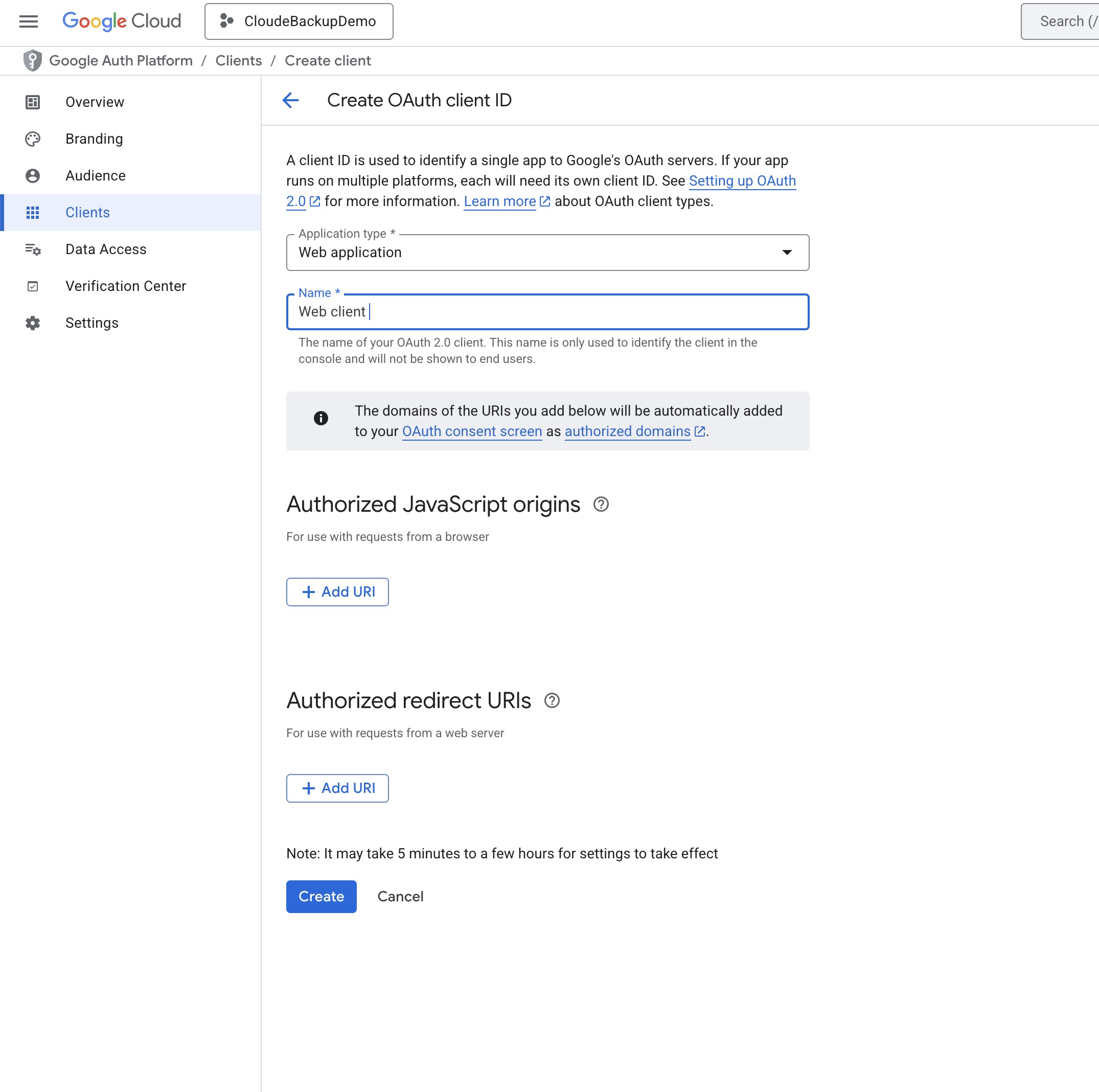
ফ্লাটারে গুগল ব্যবহার করে লগিন করার জন্য অফিশিয়াল প্যাকেজ রয়েছে। ফ্লাটারে ব্যবহার করার জন্য একটা ওয়েব ক্লায়েন্ট তৈরি করতে হবে। এর জন্য গুগল ডেভেলপার কনসোল থেকে একটা অ্যাপ তৈরি করতে হবে। এরপর Google Auth Plantform > Clients থেকে নতুন একটা ওয়েব ক্লায়েন্ট তৈরি করতে হবে।
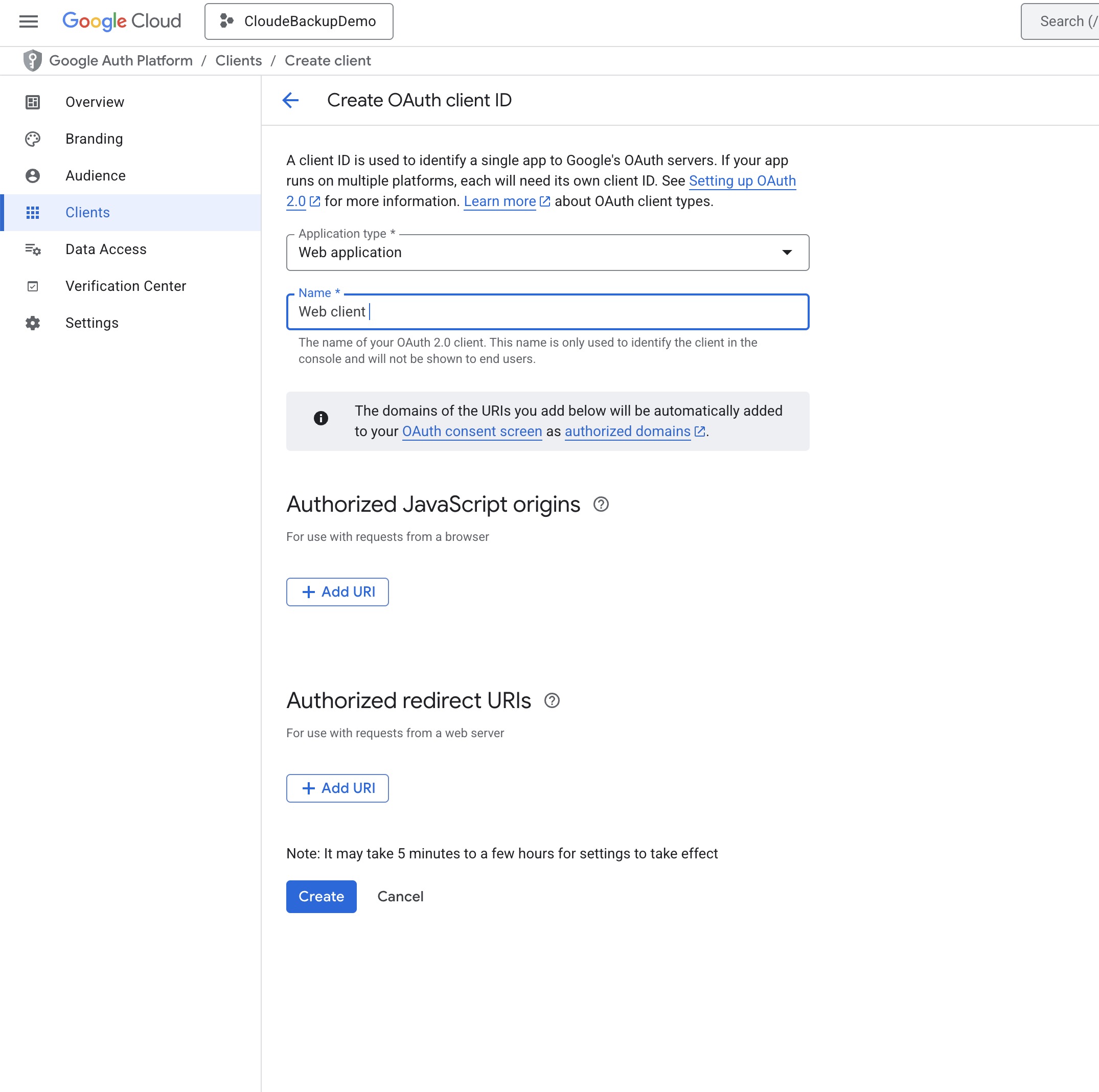
তৈরি করার পর একটা আইডি পাবো। ঐ আইডি ব্যবহার করে আমরা অথেনটিকেট করতে পারব। এখানে সিম্পল একটা ইমপ্লিমেন্টেশন দেওয়া আছে।
import 'package:flutter/material.dart';
import 'package:google_sign_in/google_sign_in.dart';

void main() => runApp(const MyApp());

class MyApp extends StatelessWidget {
  const MyApp({super.key});

  @override
  Widget build(BuildContext context) {
    return const MaterialApp(
      title: 'Google Sign-In Demo',
      home: SignInTest(),
    );
  }
}
class SignInTest extends StatefulWidget {
  const SignInTest({super.key});
  @override
  State<SignInTest> createState() => _SignInTestState();
}

class _SignInTestState extends State<SignInTest> {
  final GoogleSignIn _googleSignIn = GoogleSignIn.instance;
  GoogleSignInAccount? _user;
  bool _isInitialized = false;

  @override
  void initState() {
    super.initState();
    _initializeGoogleSignIn();
  }

  Future<void> _initializeGoogleSignIn() async {
    try {
      // Initialize GoogleSignIn - scopes are now requested via authorizationClient
      // serverClientId is required for authentication
      await _googleSignIn.initialize(serverClientId: 'asdf-asdf.apps.googleusercontent.com');
      _isInitialized = true;

      // Listen to authentication events
      _listenForAuthChanges();

      // Attempt to restore previous session
      await _restorePreviousSession();
    } catch (e) {
      debugPrint('Failed to initialize Google Sign-In: $e');
    }
  }

  void _listenForAuthChanges() {
    _googleSignIn.authenticationEvents.listen((event) {
      if (event is GoogleSignInAuthenticationEventSignIn) {
        setState(() => _user = event.user);
      } else if (event is GoogleSignInAuthenticationEventSignOut) {
        setState(() => _user = null);
      }
    }, onError: (error) {
      debugPrint('Authentication error: $error');
    });
  }

  Future<void> _restorePreviousSession() async {
    if (!_isInitialized) return;

    try {
      final future = _googleSignIn.attemptLightweightAuthentication();
      if (future != null) {
        final currentUser = await future;
        if (currentUser != null && mounted) {
          setState(() => _user = currentUser);
        }
      }
    } catch (e) {
      debugPrint('Failed to restore session: $e');
    }
  }

  Future<void> _signIn() async {
    if (!_isInitialized) {
      debugPrint('Google Sign-In not initialized yet');
      return;
    }

    try {
      final user = await _googleSignIn.authenticate(
        scopeHint: ['email', 'profile'],
      );
      if (mounted) {
        setState(() => _user = user);
      }
    } catch (e) {
      debugPrint('Sign-in error: $e');
      // Show error to user
      if (mounted) {
        ScaffoldMessenger.of(context).showSnackBar(
          SnackBar(content: Text('Sign-in failed: ${e.toString()}')),
        );
      }
    }
  }

  Future<void> _signOut() async {
    if (!_isInitialized) return;

    try {
      await _googleSignIn.signOut();
      setState(() => _user = null);
    } catch (e) {
      debugPrint('Sign-out error: $e');
    }
  }

  @override
  Widget build(BuildContext context) {
    final user = _user;
    return Scaffold(
      appBar: AppBar(title: const Text('Google Sign-In  Test')),
      body: Center(
        child: user == null
            ? ElevatedButton(
                onPressed: _signIn,
                child: const Text('Sign in with Google'),
              )
            : Column(
                mainAxisSize: MainAxisSize.min,
                children: [
                  if (user.photoUrl != null)
                    CircleAvatar(
                      backgroundImage: NetworkImage(user.photoUrl!),
                      radius: 40,
                    ),
                  const SizedBox(height: 16),
                  Text('Signed in as: ${user.displayName ?? 'No name'}'),
                  Text(user.email),
                  const SizedBox(height: 16),
                  ElevatedButton(
                    onPressed: _signOut,
                    style: ElevatedButton.styleFrom(backgroundColor: Colors.red),
                    child: const Text('Sign Out'),
                  ),
                ],
              ),
      ),
    );
  }
}
লগিন করা না থাকলে লগিন বাটন থাকবে। আর লগিন করা থাকলে লগিন করা ইউজারের ইনফো দেখাবে।
Sponsored
Sponsored
- Nulled
- Tech
- Job
- Hacking Course
- News
- Out Knowledge
- Status
- Quotes
- Caption
- Stories
- Education
- Shopping
- Entertainment
- Lifestyle
- Business
- Travel
- Opinion
- Art
- Causes
- Crafts
- Dance
- Drinks
- Film
- Fitness
- Food
- Games
- Gardening
- Health
- Home
- Literature
- Music
- Networking
- Other
- Party
- Religion
- Shopping
- Sports
- Theater
- Wellness

 Arabic
 French
 Spanish
 Portuguese
 Deutsch
 Turkish
 Dutch
Dutch
 Italiano
 Russian
 Romaian
 Portuguese (Brazil)
 Greek
Greek