Sponsored
অ্যান্ড্রয়েড রেডিও বাটন
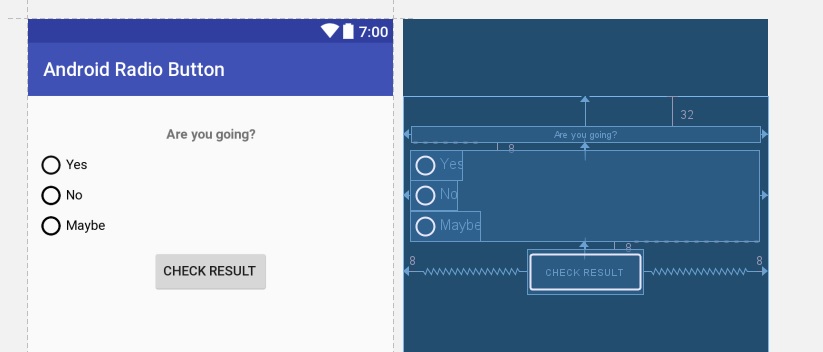
মাঝে মাঝে আমাদের অ্যাপে ইউজার থেকে কোন ইনপুট নিতে হয়। যেমন ধরা যাকা কোন ইভেন্টে ইউজার কি যাবে কি যাবে না। এই কাজটা আমরা করতে পারি রেডিও বাটন দিয়ে। রেডিওবাটনের অপশন গুলো সব গুলো রাখতে হয় বাটন গ্রুপে। যেমন আমরা নিচের মত করে একটা লেয়াউট তৈরি করতে পারি নিচের মত করেঃ
এখানে আমরা একোটা টেক্সট ভিউ রেখেছি, রেডিওবাটন গ্রুপ রেখেছি আর একটা বাটন রেখেছি। কোড গুলো নিচের মত করে লিখতে পারিঃ
<?xml version="1.0" encoding="utf-8"?>
<android.support.constraint.ConstraintLayout xmlns:android="http://schemas.android.com/apk/res/android" xmlns:app="http://schemas.android.com/apk/res-auto" xmlns:tools="http://schemas.android.com/tools" android:layout_width="match_parent" android:layout_height="match_parent" tools:context="me.jakir.androidradiobutton.MainActivity">

    <TextView android:id="@+id/textView2" android:layout_width="368dp" android:layout_height="wrap_content" android:layout_marginLeft="32dp" android:layout_marginRight="32dp" android:layout_marginTop="32dp" android:text="Are you going?" android:textAlignment="center" android:textStyle="bold" app:layout_constraintLeft_toLeftOf="parent" app:layout_constraintRight_toRightOf="parent" app:layout_constraintTop_toTopOf="parent" />

    <RadioGroup android:layout_width="match_parent" android:layout_height="wrap_content" android:layout_marginLeft="8dp" android:layout_marginRight="8dp" android:layout_marginTop="8dp" android:orientation="vertical" app:layout_constraintLeft_toLeftOf="parent" app:layout_constraintRight_toRightOf="parent" app:layout_constraintTop_toBottomOf="@+id/textView2" android:id="@+id/radioGroup">

        <RadioButton android:id="@+id/yes" android:layout_width="wrap_content" android:layout_height="wrap_content" android:text="Yes" />

        <RadioButton android:id="@+id/no" android:layout_width="wrap_content" android:layout_height="wrap_content" android:text="No" />
        <RadioButton android:id="@+id/maybe" android:layout_width="wrap_content" android:layout_height="wrap_content" android:text="Maybe" />
    </RadioGroup>

    <Button android:id="@+id/button" android:layout_width="wrap_content" android:layout_height="wrap_content" android:layout_marginLeft="8dp" android:layout_marginRight="8dp" android:layout_marginTop="8dp" android:text="Check Result" app:layout_constraintLeft_toLeftOf="parent" app:layout_constraintRight_toRightOf="parent" app:layout_constraintTop_toBottomOf="@+id/radioGroup" />

</android.support.constraint.ConstraintLayout>
কনস্ট্রেন্ট লেয়াউট ব্যবহার করার কারণে অনেক গুলো বাড়তি কোড যুক্ত হয়েছে। মূল কোড হচ্ছে এরকমঃ
<RadioGroup android:layout_width="fill_parent" android:layout_height="wrap_content" android:orientation="vertical">
    <RadioButton android:id="@+id/yes" android:layout_width="wrap_content" android:layout_height="wrap_content" android:text="Yes" />
    <RadioButton android:id="@+id/no" android:layout_width="wrap_content" android:layout_height="wrap_content" android:text="No" />
</RadioGroup>
এরপর যখন সাবমিট বাটনে ক্লিক করবে, আমরা চেক করব কোন রেডিও বাটনটি সিলেক্ট করা হয়েছে। getCheckedRadioButtonId() দিয়ে কোন বাটনটি চেক করা হয়েছে, তা পাওয়া যাবে। এরপর আমরা যে কোন কাজ করতে পারি। যেমন উদাহরণে ঐ বাটনের টেক্সট আমরা পড়ে টোস্টে দেখিয়েছি। সম্পূর্ণ কোডঃ
import android.os.Bundle;
import android.support.v7.app.AppCompatActivity;
import android.view.View;
import android.widget.Button;
import android.widget.RadioButton;
import android.widget.RadioGroup;
import android.widget.Toast;

public class MainActivity extends AppCompatActivity {

    RadioGroup radioGroup;
    RadioButton radioButton;
    Button result;


    @Override
    protected void onCreate(Bundle savedInstanceState) {
        super.onCreate(savedInstanceState);
        setContentView(R.layout.activity_main);

        radioGroup = (RadioGroup) findViewById(R.id.radioGroup);

        result = (Button) findViewById(R.id.button);

        result.setOnClickListener(new View.OnClickListener() {
            @Override
            public void onClick(View v) {
                int selectedButton = radioGroup.getCheckedRadioButtonId();
                radioButton = (RadioButton) findViewById(selectedButton);
                Toast.makeText(MainActivity.this, "You have selected: " +
                        radioButton.getText(), Toast.LENGTH_SHORT).show();
            }
        });

    }


}
Sponsored
Sponsored
- Nulled
- Tech
- Job
- Hacking Course
- News
- Out Knowledge
- Status
- Quotes
- Caption
- Stories
- Education
- Shopping
- Entertainment
- Lifestyle
- Business
- Travel
- Opinion
- Art
- Causes
- Crafts
- Dance
- Drinks
- Film
- Fitness
- Food
- Games
- Gardening
- Health
- Home
- Literature
- Music
- Networking
- Other
- Party
- Religion
- Shopping
- Sports
- Theater
- Wellness

 Arabic
 French
 Spanish
 Portuguese
 Deutsch
 Turkish
 Dutch
Dutch
 Italiano
 Russian
 Romaian
 Portuguese (Brazil)
 Greek
Greek