আইওএস কালেকশন ভিউ

অনেক গুলো অ্যাপই টেবিল ভিউ দিয়ে করা যায়। কিন্তু কমপ্লেক্স কোন ডিজাইন হলে তা টেবিল ভিউ দিয়ে করা গেলেও ইফিশিয়েন্ট হয় না। আর তার জন্য রয়েছে কালেকশন ভিউ। আমরা সহজে কিভাবে কালেকশন ভিউ নিয়ে কাজ করা যায়, তা দেখব। আমাদের কালেকশন ভিউতে একটা ইমেজ এবং একটা লেভেল থাকবে।
স্টোরিবোর্ডের ভিউতে অবজেক্ট লাইব্রেরি থেকে কালেকশন ভিউ যুক্ত করি। এখানে Collection View Controller, Collection View, Collection View Cell ইত্যাদি থাকবে। আমরা শুধু Collection View যুক্ত করব।
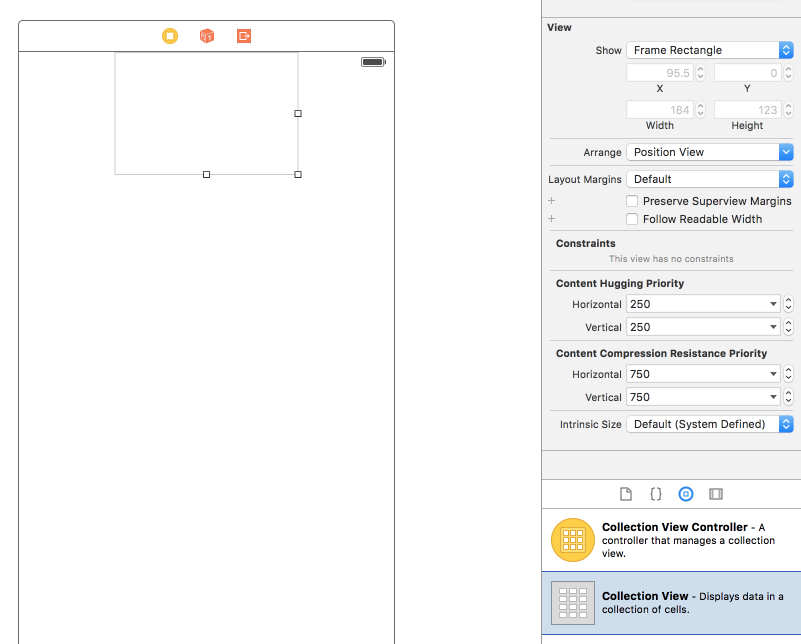
রিসাইজ করে নিব। এবং Collection View Cell টিও রিসাইজ করে নিব নিজ ইচ্ছে মত। Collection View Reusable View এর Identifier থেকে একটা আইডেন্টিফায়ার দিব। যেমন cell.
কালেকশন ভিউ এর সেলে একটা ইমেজ ভিউ এবং একটা লেভেল যুক্ত করব।
একটা সুইফট ক্লাস তৈরি করব। তার জন্য File মেনু থেকে New > File > Cocoa Class সিলেক্ট করব। Subclass of থেকে UICollectionViewCell সিলেক্ট করব। এবং একটা নাম দিব। যেমন CollectionViewCell। এই ক্লাসটি আমাদের কালেকশন ভিউ এর সেলের সাথে যুক্ত করতে হবে। তার জন্য কালেকশন ভিউ এর সেল সিলেক্ট করে Identity Inspector থেকে Custom Class থেকে CollectionViewCell ক্লাসটি সিলেক্ট করে দিব।

CollectionViewCell ক্লাসে Image view এবং Label টা কানেক্ট করব।
কিছু ইমেজ যুক্ত করব এসেটে। ViewController এ দুইটা অ্যারে যুক্ত করব। একটা ইমেজের জন্য। আরেকটা লেভেলের জন্য।
let labelArray = ["Bird 1", "Bird 2", "Car"]
let imageArray = [UIImage(named: "bird1"), UIImage(named: "bird2"), UIImage(named: "Car")]
কালেকশন ভিউ ব্যবহার করতে হলে আমাদের দুইটা মেথড অবশ্যই ইম্পপ্লিমেন্ট করতে হবে। সে গুলো হচ্ছেঃ
func collectionView(collectionView: UICollectionView, numberOfItemsInSection section: Int) -> Int {

        return labelArray.count
    }


    func collectionView(collectionView: UICollectionView, cellForItemAtIndexPath indexPath: NSIndexPath) -> UICollectionViewCell {

        let cell = collectionView.dequeueReusableCellWithReuseIdentifier("cell", forIndexPath: indexPath)as! CollectionViewCell

        cell.imageView?.image = self.imageArray[indexPath.row]
        cell.titleLabel.text = self.labelArray[indexPath.row]

    return cell
    }
সম্পুর্ণ সুইফট ফাইলঃ
import UIKit

class ViewController: UIViewController, UICollectionViewDelegate, UICollectionViewDataSource {

    @IBOutlet weak var collectionView: UICollectionView!
    let labelArray = ["Bird 1", "Bird 2", "Car"]
    let imageArray = [UIImage(named: "bird1"), UIImage(named: "bird2"), UIImage(named: "Car")]

    override func viewDidLoad() {
        super.viewDidLoad()
        // Do any additional setup after loading the view, typically from a nib.
    }

    override func didReceiveMemoryWarning() {
        super.didReceiveMemoryWarning()
        // Dispose of any resources that can be recreated.
    }


    func collectionView(collectionView: UICollectionView, numberOfItemsInSection section: Int) -> Int {

        return labelArray.count
    }


    func collectionView(collectionView: UICollectionView, cellForItemAtIndexPath indexPath: NSIndexPath) -> UICollectionViewCell {

        let cell = collectionView.dequeueReusableCellWithReuseIdentifier("cell", forIndexPath: indexPath)as! CollectionViewCell

        cell.imageView?.image = self.imageArray[indexPath.row]
        cell.titleLabel.text = self.labelArray[indexPath.row]

    return cell
    }


}
- Nulled
- Tech
- Job
- Hacking Course
- News
- Out Knowledge
- Status
- Quotes
- Caption
- Stories
- Education
- Shopping
- Entertainment
- Lifestyle
- Business
- Travel
- Opinion
- Art
- Causes
- Crafts
- Dance
- Drinks
- Film
- Fitness
- Food
- Games
- Gardening
- Health
- Home
- Literature
- Music
- Networking
- Other
- Party
- Religion
- Shopping
- Sports
- Theater
- Wellness

 Arabic
 French
 Spanish
 Portuguese
 Deutsch
 Turkish
 Dutch
Dutch
 Italiano
 Russian
 Romaian
 Portuguese (Brazil)
 Greek
Greek